SCAN TOOLS PRE -1998
850 OBDII ANDROID APP
Shortly this App aims to replace Volvo´s official VST tester (and more?) to diagnose Volvo P80 platform years of 96 to 00 ( +growing support for P1, P2 platforms!(future P3 too!)) through reading, programming parameters, remotes and so on... With Android and ELM327 Bluetooth/Wifi/USB adapter devices. Additionally the universal OBDII standard reading has been included. Read more details below at ´Detailed Function List´ section.
850 OBDII APP ANDROID ONLY
Official Website & Google Play App
Shortly this App aims to replace Volvo´s official VST tester (and more?) to diagnose Volvo P80 platform years of 96 to 00 ( +growing support for P2 platforms!) through reading, programming parameters, remotes and so on... With Android and ELM327 Bluetooth/Wifi/USB adapter devices.
Additionally the universal OBDII standard reading has been included. Read more details below at ´Detailed Function List´ section.
Official Website
https://xiaotec.fi/?lang=en&a=10
Official Google Play App
https://play.google.com/store/apps/details?id=xiaotec.fi.obdii
What scanning (ELM327) device?
ELM327 must fulfill genuine V1.4b level of the device which many china devices does not fill!
There is a wide range of brands of these so be careful. Volvo needs to have FULL WORKING V1.4b support at minimum!
I ordered two same looking but inside different ELM327 clones and as you can see from picture that other one has two layers of boards.
Other one (left) is not compatible with Volvo as i tested it did crash at ATSI command which it didn´t regocnize and it did send only ? - questionmark.
Most cases is that on not working ones has COB chip (Chip-On-Board) or lamer terms black epoxy glue over unknown chip.
Working ones has original ELM PIC chip or well emulated firmware in PIC18F chip.
Fake VS Real ELM327 PIC18F25K80
The ELM327 is a popular IC developed by Elm Electronics for communicating with the standard OBDII (On Board Diagnostics) protocols through the OBD2 port on your vehicle.
This is used by mechanics and DIY’ers to diagnose and troubleshoot vehicle problems.
It is also used by enthusiasts for getting useful information about your vehicle in real-time, such as speed, revs, temperature, air-flow, fuel consumption, etc.
Please read the following articles to gain understanding and knowledge.
An article from https://cvtz50.info/en/elm327/
An article from https://timyouard.wordpress.com/2015/09/02/disection-of-a-counterfeit-elm327-obdii-adapter-from-china/
REPORTED WORKING BRANDS
| BRAND | WEBSITE | LINK | PRICE | NOTES |
| OBDLink MX+ OBD2 Bluetooth Scanner for iPhone, Android, and Windows |
Amazon | LINK | £149.95 (19/08/2024) |
App Developer Recommended |
| Veepeak OBDCheck BLE+ Bluetooth OBD II Scanner Car OBD Code Reader Auto Engine Diagnostic Scan Tool for iOS & Android |
Amazon | LINK | £39.99 (19/08/2024) |
App Developer Recommended The non + version is not recommended |
| Viecar ELM327 V1.5 Bluetooth 4.0 OBD2 PIC18F25K80 ELM 327 V1 5 OBDII Car Diagnostic Scanner ODB2 Auto tool Code Reader |
Aliexpress | LINK | £2.56 Ex Tax (19/08/2024) |
Tested by me (Kyle) |
| OBD2 ELM 327 Bluetooth Car Scanner for use with Volvo 850 OBD-II app |
Ebay | LINK | £19.95 (19/08/2024) |
Untested, Ebay has good refund policy |
Special case(s)
UCSI-2000 - Slight bugs in firmware.
Tacklife AOBD1B - Firmware has crash/freezing bugs (device goes in total black out) in ELM emulation so better run "No ELM info Scan" - option Enabled in SCAN Options.
Manufacturer answer when reported bugs - "We currently have no intention to cooperate.".
NOT WORKING
Konnwei
BlueDriver OBD2 Scanner (seems only work on their app ex. crashes with ATZ and ATPC commands.)
OBDCheck BLE (Veepeak)
Vgate vLinker FD+
By suggestions and feedback app keeps getting more filled and fixed. Send people log via settings page (bottom) as there is simple button for that. Thank you if you may :)
I don’t have now myself any open inventory as I am in process building new and customised adapter in house as I need ask more from dongle in future coming features what elm327 was not ever designed for.
Remember keep ignition on at (II - position) to have power on ECUs! And dont forget leave ELM327 device plugged when you done.. at least in my Volvo 850 there is always electricity at OBDII port and Bluetooth ELM327 draws 0.04A most of the time.
Remember too that many ELM327 devices may have problem connect when over 1 meter away from your phone.
Bluetooth:
Click Bluetooth icon at the top-right corner - Bluetooth Devices.
Or by going Settings/Bluetooth Devices -page.
Select your device from the list of already paired OBDII device or click Search -button to find your device and select it.
Connect at your device by clicking Play button at top-right corner (changes then to green pause button when connected).
Use the app functions!
Reading the modules (information, parametres, odometer status..) happens At Service/Scan and results will be saved at main (summary) page.
Reading sensor data happens at Live.
Note! If you select to Scan only OBDII standard to find Fault codes. You will miss a lot as Volvo had most Fault codes report via individual modules via their own codes and not as standard OBDII Pxxx -codes (most modules does not set any Pxxx codes ever!). This option was mostly included if wanted scan any car with OBDII port on this standard way.
Two examples why too need be careful with these "standardized" OBDII reportings due manufacturers having mind of their own in same playfield.. On Live side OBDII ex. Intake Air Temperature PID on Motronic M4.4 ECM is not IAT but Ambient Temp. Sensor output. Another example is possibility get Pxxx fault code on Citröen of bad secondary air valve which that model did not even have.. though main fault ended up being faulty secondary air pump.
You can Export Scan readings too as text file if you have had Datalog on to 850Log.txt via Settings/EXPORT LOG.
D5252T MSA15.7 (1997-1998) / MSA15.8 (1999-2000)
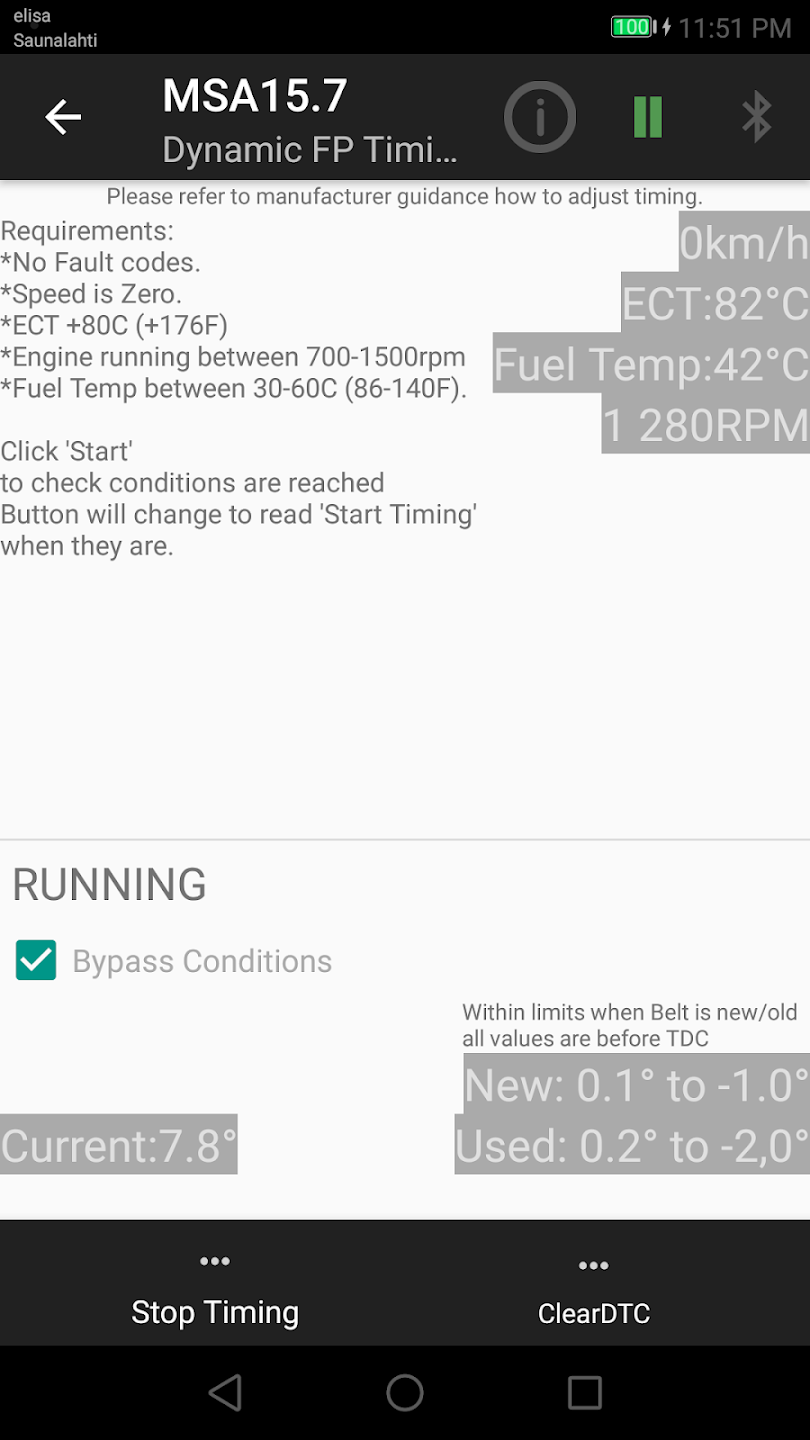
MSA15.7 |
| -Dynamic Fuel Pump Timing (TDI) |
| -EGR Valve |
| -Turbo Regulating Valve |
| -MIL light |
| -Heater Relay 1 |
| -Heater Relay 2/3 |
| -Engine Cooling Fans (Low/High speed) |
| -Low Idle Adjust Parameter |
| -Start Fuel Adjustment |
| -EGR Adjustment |
MSA15.8 |
| -Programming Low Idle Speed Adjustment |
850/900 series
These ECUs can be reached by ELM327 on 850´s:
Motronic M4.4
MSA15.7
AW50-42 (Automatic Gearbox)
ABS
SRS (Airbag)
COMBI (VDO dashboard)
Front Electric Seats
IMMO
But these can not be due being older diagnostic systems:
-Dashboard manufactured by Yazaki
-Motronic M4.3
-MFI system (LH-jetronic 3.2 & EZ129K)
-Fenix 5.2
-ECC(A/C)
-Cruise Control
850 had two dashboard manufacturers VDO and Yazaki which only VDO has OBD diagnostics (COMBI).
C70/S70/V70/XC70, S90/V90
On these mostly all were upgraded to use newer OBD diagnostic system except Fenix 5.2 ECM (10 valve gasoline engines) which all the App supports (list below what all).
So additionally to previous models these are too supported:
DSA, RTI, ROP, ECC, VGLA, Convertible Top Module, 912-D Heater and Yazaki dashboard.
VGLA Remote Programming is supported and can be done fully without Volvo dealership and if ECC is stuck in calibration mode it can be kicked off to return operation as some special functions only found on this App.
S40/V40 models up to year 2004
These has some special attention required like COMBI uses slightly different commands on live data and more fixes for those are coming on later updates or by request and wishes.
V1.7.9 Has brought support for ABS sensors to be readen on Live Data and support for Tire Size and Service light programming on these models.
P80 Year models 1999-2000 (SVXC70 models mostly, not ex. S80)
These were development years for Volvo as V70 models are working partially under CAN Bus like Dashboard (CDM/CEM), Engine ECU (ECM) or ABS.
VGLA (Alarm), Immobiliser, SRS, AW 50-42.. been on older systems still as fully or parallel.
VGLA Remote and IMMO Key Programming is supported on these years as well (reported too working by the users).
CAN Bus support of the App:
+Dashboard (CDM/CEM) has Service Light programming, reading and clearing fault codes, Service Light (SRI) reset and programming and GAUGETEST function.
+ECM (ME7) reading and clearing fault codes and Live Data (since V1.7.9 growing support by the requests).
+ETM reading and clearing fault codes.
+ECM (DENSO) reading and clearing fault codes.
+ECM (MSA15.8) reading and clearing fault codes.
+TCM (Gearbox) module reading and clearing fault codes and Pressure and Oil quality adaptation reset.
+ABS(BCM) module reading and clearing fault codes
C70 year models up to 2004
Additionally to previous listing:
+ROPS reading and clearing fault codes.
+CAB (CCU aka Cab Control System) reading and clearing fault codes.
P2 Year models since 2000 (1998 since S80 models) and XC90 models
Volvo went mostly under multi CAN Bus systems (Slow & High Speed).
ELM327 is hardwired only to High Speed CAN Bus (OBDII 6,14) and you need connect those to Slow Speed CAN Bus side (OBDII 3,11) with a switch or with an adapter on these years to reach some of systems like DIM on this CAN Bus.
DO NOT MAKE SHORT CIRCUIT / JUMP BETWEEN CAN Bus PINS!
App supports at moment Dashboard (DIM) test in Service >> GAUGETEST when done this hardware mod!
CAN Bus support of the App:
+CEM reading information, fault codes and clearing fault codes.
+ECM (ME7) reading and clearing fault codes and Live Data (since V1.7.9 growing support by the requests).
+ETM reading and clearing fault codes.
+ECM (MSA15.8) reading and clearing fault codes.
+TCM (Gearbox) module reading and clearing fault codes and Pressure and Oil quality adaptation reset.
+ABS(BCM) module reading and clearing fault codes.
+DEM module reading and clearing fault codes *under testing*.
P2 Platforms, year models since 2005 (SVXC70, S60, S80 etc..)
Main features:
+Service Light (SRI) Reset / Programming (COMBI and CDM).
+ DTC / Fault Code Reading and clear ( Service >> Scan / ClearDTC ).
-SRS light? It will turn off if there is no left any active faults.
+Live Data ( realtime sensor data / Scrolling Values ).
+Reading info of the car modules (ex. part numbers and parameters).
+Test Functions and programmable parameters or Activations ( Service >> Advanced ) as example. >> Injector testing (Motronic M4.4)
>> TDi Fuel pump Dynamic Timing (MSA15.7)
>> (VGLA) Remote Programming (P80 platform 70 year models 1997 to 2000, and C70 models up to 2004).
.. and much more!
Detailed Function List
Fault Code Definitions supported: |
| -Motronic (M4.4) |
| -EMS2000 |
| -MSA15.7 (only with D5252T engines!) |
| -DENSO |
| -AW 50-42 / AW 30-43 |
| -COMBI |
| -VGLA (Alarm) |
| -912-D Heater |
| -ECC (only S40/V40, C70/S70/V70/XC70) |
| -IMMO |
| -RTI |
| -SRS (up to 2000 year models and 40 series and C70 models up to 2004 year) |
| -Powerseats |
| -ROP (Roll Over Protection) (only C70) |
| -CAB (CCU) (only C70) |
P2 platform |
| -CEM |
| -BCM (ABS) |
| -ECM ME7 |
| -ETM |
| -ECM EDC16 |
| -ECM MSA15.8 |
| -DEM |
| If a module isn't listed here, means it may not have all fault code definitions but App does collect all hex values of DTC. |
Live Data: |
| -OBDII Standard (partly) |
| -ABS |
| -SRS (airbag) |
| -Instrument panel (COMBI) |
| -AW 50-42 / AW 30-43 (Automatic Gearbox) |
| -MSA15.7 |
| -Motronic 4.4 |
| -ECM ME7 (CAN Bus) |
| -IMMO |
| -VGLA |
| -ECC (Aircon) |
| -HEAT (CPM / 912D / Additional Heater) |
| -Power Seats |
Advanced (component test, parameter configuration or activations): |
| >>Instruments (COMBI, CDM) -Service (SRI) light parameters when lights up (mileage, time or use hours) -Wheel Size parameter (Att! ONLY for 850 models. There is no yet good reference information of value to wheel size. |
| Affects Speedo and odometer mileage) -Country Code parameter (Remember save your original value! V70 dash can transform between miles to km by this!). -Speed Warning Program (If Dashboard supports this and or you have done retro fitment.) |
Motronic (M4.4) |
| -Engine Cooling Fans (Low/High speed) |
| -IAC Valve |
| -Injector Testing |
| -Fuel Pump Relay |
| -SAS Air Pump |
| -SAS Air Valve |
| -EVAP Control Valve (Shut-off, Purge) |
EMS2000 |
| -Reset Adaption Memory |
MSA15.7 |
| -Dynamic Fuel Pump Timing (TDI) |
| -EGR Valve |
| -Turbo Regulating Valve |
| -MIL light |
| -Heater Relay 1 |
| -Heater Relay 2/3 |
| -Engine Cooling Fans (Low/High speed) |
| -Low Idle Adjust Parameter |
| -Start Fuel Adjustment |
| -EGR Adjustment |
MSA15.8 |
| -Programming Low Idle Speed Adjustment |
TCM AW50-42 (Non CAN) |
| -S1 and S2 Solenoids |
| -Lock-up Solenoid |
| -Line Pressure Solenoid |
| -Warning Light |
| >> TCM P2 Platform (CAN Bus) |
| -Erase Adaptive Data (Adaptive Pressure) |
| -Erase Adaptive Data (Oil Quality) |
ABS |
| -ABS Pump |
| -Valves (Solenoids) Testing |
ECC (A/C) |
| -ECC Activate self-adjustment *App includes so called Exit Self-Adjustment function to recover ECC back to functional status if ECC is stuck in Self-Adjustment brick/fault mode due fault in ECC system |
| -ECC Update |
| -ECC Configuration (Parametres) |
DSA (Dynamic Stability Assistance) |
| -Reset Wheel Adaption |
| >> VGLA (Alarm ex. V70 models) |
| -Add Remote ( Remote Programming on 70 Series models for years 97 to 00 ) |
| -Retrieve PIN |
| -Configuration |
IMMO |
| -Key Programming |
HEAT (CPM / Additional Heater) |
| -Configuration |
Simple but advanced as possible and expand in future as far i can. Only difficulties for user should be is connecting to your OBDII ELM327 device. Keep Ignition II On position while using App. Note: One tested S60 system ECM stayed off until turned engine On -- possible Ignition wear.
Example of Wifi and Bluetooth connection + reading.
VOL-FCR
PC based code reader and live data scan tool for Volvo cars including 800 Series, C70, S40, V40, S70, V70, 900 series, S90 and V90
VOL-FCR
PC based code reader and live data scan tool for Volvo cars including 800 Series, C70, S40, V40, S70, V70, 900 series, S90 and V90
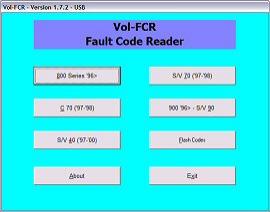
This PC / Laptop based tool covers most pre-2000 models and reads and clears fault codes on almost all modules fitted including engine management, airbag, abs, instruments, immobiliser etc.
Will work on Windows system's including Windows 11, Tested (24/03/2025)
> USE AT YOUR OWN RISK
> I would advise not connecting to WIFI or the internet due to the nature of the software.
DOWNLOAD HERE ---->VOL-FCR 1.7.6.zip <---
VAG-COM 409.1 KKL OBD2 cable
With the VAG-COM KKL 409.1 OBD2 cable, you can connect a laptop, etc. to the car and thus use computer-compatible diagnostic programs to read and reset fault codes.
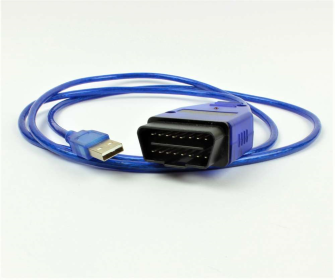
VAG-COM 409.1 KKL OBD2 cable
In addition to VAG Group cars (VW, Audi, Seat, Skoda), the VAG-COM KKL 409.1 OBD2 cable also works in some Volvo, Subaru, Alfa Romeo and Fiat. The device can also be used to connect a motorcycle diagnostic program with some motorcycles, like Aprilia, KTM and Triumph brands. These also require an adapter between the OBD2 connector and the motorcycle.
Depending on the software, the reader can do, for example:
- Resetting and reading fault codes (with VCDS-Lite)
- Monitoring sensor values live (with VCDS-Lite)
- Access to all control modules such as ECU, ABS, air conditioning (with VCDS-Lite)
- With the registered VCDS program, it is possible to activate various components and change the data of the control units.
Software and supported brands:
VAG-COM 311.2, 409.1 VW, Audi, Skoda, Seat 1990-2004
VCDS-Lite - VW, Audi, Skoda, Seat 1990-2004
VOL-FCR - Volvo
Multiecuscan - Fiat, Lancia, Alfa Romeo
FreeSSM - Subaru
ECUExplorer - Subaru
TuneECU - motorcycles Aprillia, KTM and Triumph
Drivers
VAG-COM 409.1 KKL OBD2 cable you will need drivers from FTDI to use the cable, get the latest version of the cables from below
https://ftdichip.com/drivers/vcp-drivers/
How to change hardware ID
Step 1: Download the Tool
-
Go to the official Microsoft VolumeID Download Page.
-
Click the link that says "Download VolumeID".
-
Open your Downloads folder, right-click
VolumeId.zip, and select Extract All. -
Open the extracted folder. You will see
volumeid.exeandvolumeid64.exe.
Step 2: Open Command Prompt as Administrator
VolumeID requires system-level permissions to modify disk headers.
-
Press the Windows Key and type
cmd. -
Right-click Command Prompt and select Run as Administrator.
-
Click Yes on the security pop-up.
Step 3: Find Your Current ID
-
In the black Command Prompt window, type:
vol C: -
Press Enter. Note the 8-character code (e.g.,
8C4F-12A3).
Step 4: Navigate to the Folder
You need to tell Command Prompt where you saved the tool. Assuming it’s in your Downloads folder:
-
Type:
cd %userprofile%\Downloads\VolumeId(or the specific folder name if different). -
Press Enter.
Step 5: Change the ID
Now, run the command. Replace XXXX-XXXX with any combination of 0-9 and A-F.
-
Type:
volumeid64 C: 1A2B-3C4D -
Press Enter.
-
A license agreement may pop up; click Agree.
-
It should say: "Volume ID updated successfully."
Step 6: Reboot and Verify
-
Restart your computer. The change will not show up until you do this.
-
Once back on your desktop, open Command Prompt again.
Type
vol C:and verify the "Volume Serial Number" matches your new ID.
VOL-FCR - Quick Guide
This is the main screen for the software and is where you choose the car model to be tested. Each button shows the model and age range that can be diagnosed by this tool.

After choosing the model you wish to diagnose you will see a new screen which shows all the available modules for the chosen vehicle
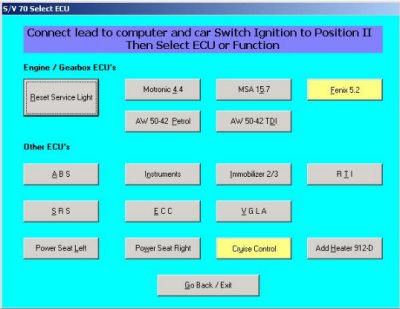
Modules shown in grey are fast data capable and can be diagnosed fully using VOL-FCR. Modules shown in yellow are not compatible with VOL-FCR and must be diagnosed using a flash code tool in a similar way to the LED tester fitted as standard to the under bonnet diagnostic socket on older Volvo cars
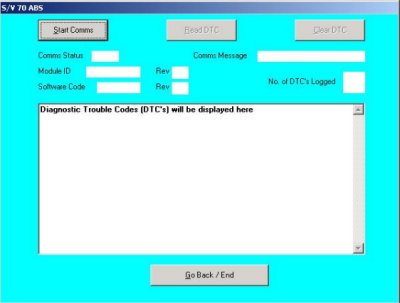
After clicking the button for the module you wish to diagnose, you will see the following screen where you can start communications between the PC and the car
After communications are established you will see ECU information displayed. You can now read the fault codes which will be displayed after a few seconds
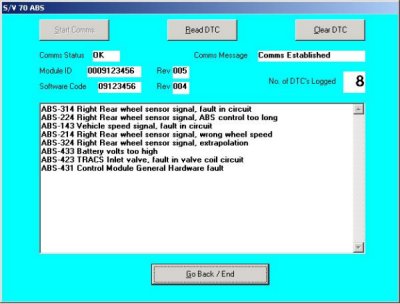
When the list of codes are displayed the clear codes button is enabled. Of course, you'll have to fix the car to stop them coming back!

TDI Timing Adjustment Screen
VOL-FCR - Model and System Coverage
Note: We do not sell this software through ebay, or through any distributor in any other country. It is only available direct from our on-line shop here at https://www.ilexa.co.uk/shop/VOL-FCR
Our VOL-FCR code reader covers a wide range of Volvo™ models including:
- 800 Series 1996 onwards: Covers Reset service light and fault code reading/clearing on Engine (but not Motronic 4.3 and Fenix 5.2), Automatic transmission, ABS, Instruments, Immobiliser, Power seats, SRS air-bag (note Cruise control and ECC are not supported)
- C70: 1996 - 1997, Reset service light and fault code reading/clearing on Engine, Automatic transmission, ABS, Instruments, Immobiliser, RTI, SRS air-bag, ECC, VGLA, ROP, Power seats, CCU (not cruise control)
- S40 and V40 1997 - 2000: Covers Reset service light and fault code reading/clearing on Engine (but not Fenix 5.1, Melco 1, or Lucas), Automatic transmission, ABS, Instruments, Immobiliser, RTI, SRS air-bag, ECC, Keyless entry, DSA, Power seats, Additional/Ardic Heater (not Cruise control)
- S70 and V70 1997 -1998: Covers Reset service light and fault code reading/clearing on Engine (but not Fenix 5.2), Automatic transmission, ABS, Instruments, Immobiliser, RTI, SRS air-bag, ECC, VGLA, Power seats, Additional/Ardic heater (not cruise control)
- 900 series, S90 and V90 1996 on: covers fault code reading/clearing on Engine (but not LH 2.4 Jetronic or EZ116K), Immobiliser, SRS, RTI. Power seats (not ABS or Cruise control)
VOL-FCR also displays live data on the following models and systems
- 90/900 Series: Motronic 4.4, Auto Trans, SRS, Immobilizer.
- 850 Series: Motronic 4.4, MSA 15.7, Auto Trans, ABS, SRS, Instruments, Immobilizer.
- 70 Series: Motronic 4.4, MSA 15.7, Auto Trans, ABS, ECC, SRS, Instruments, Immobilizer, VGLA.
- 40 Series: EMS2000, DSA, Auto Trans, ABS, SRS, Keyless Entry, Immobilizer.
Supplied as software only for use with your existing hardware which must be either serial or FTDi based USB or other similar interface
Requires Windows XP
NOTE: Vista and Windows 7 are NOT supported. Although you may get it to work on those operating systems, VOL-FCR does not officially support them
NOTE. You are purchasing a license to use this software on your own computer. It is not transferable, and we only supply activation codes to the original purchase
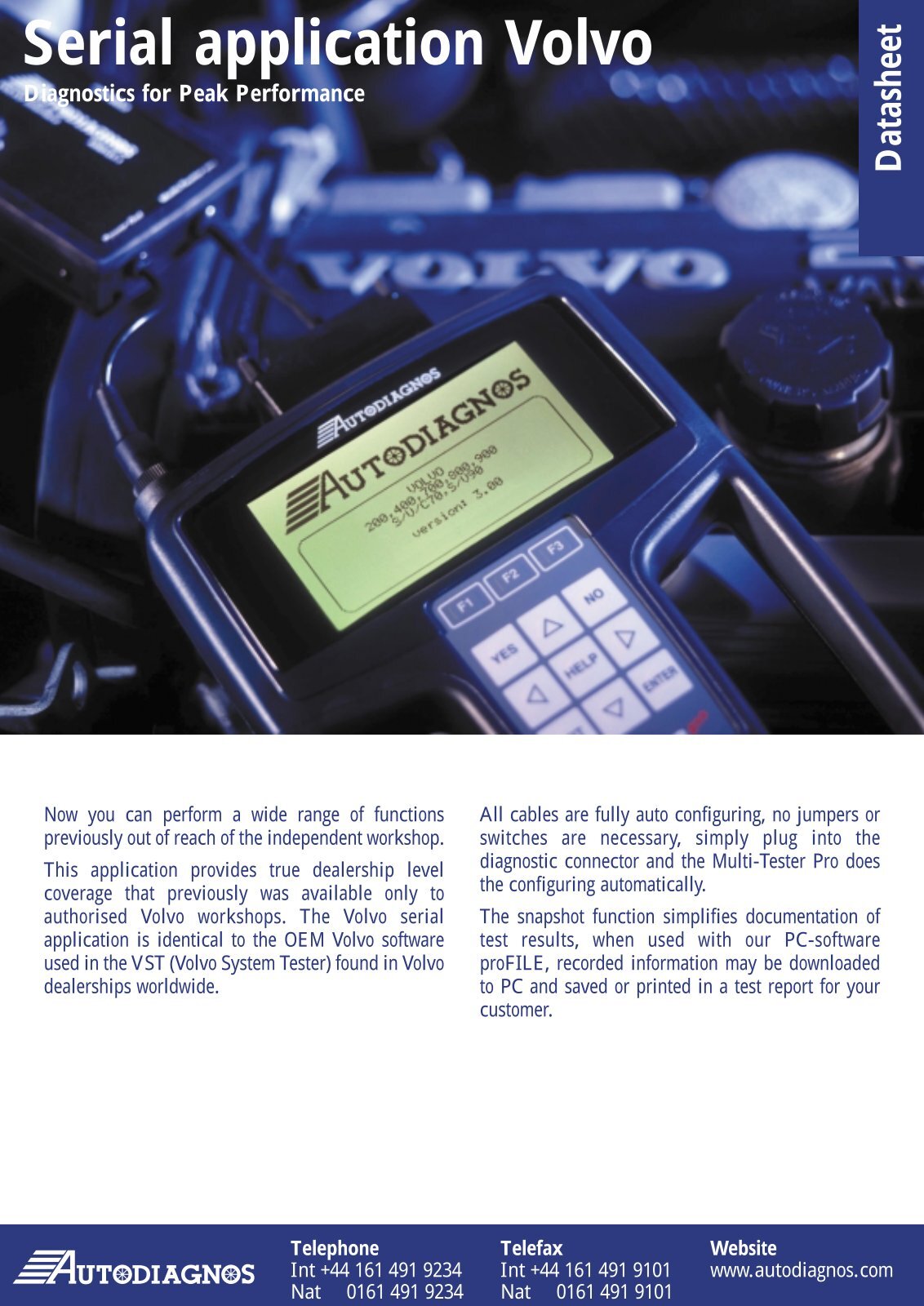
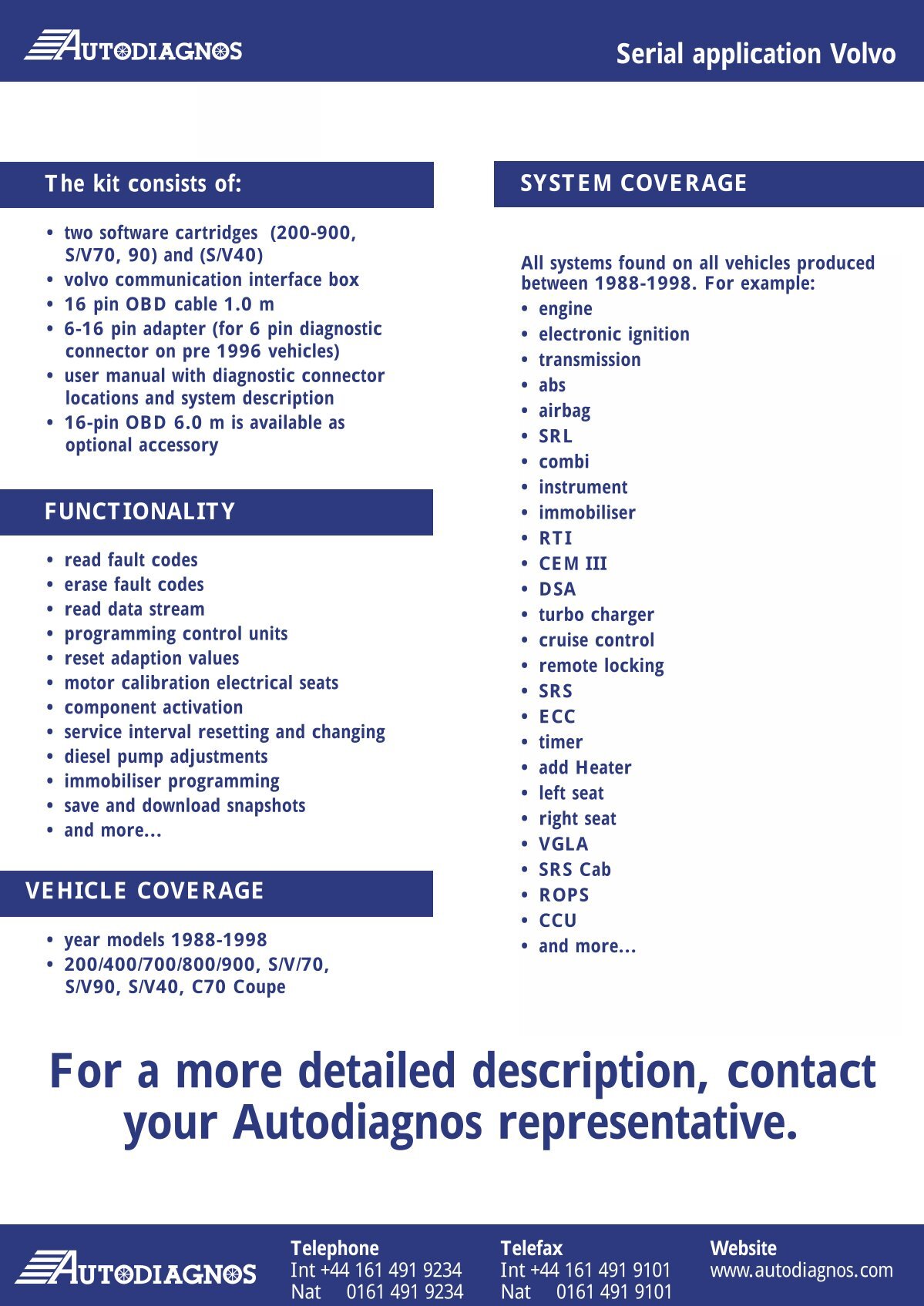
Autodiagnos Multi-Tester Pro
The Multi-Tester Pro was originally designed for a parallel interface with the vehicle’s engine management system. A variety of adapters allowed the user to tap into the major European engine management systems, between the PCM and the vehicle wiring harness. The Multi-Tester Pro saw the same input information the PCM saw. Toward the end of its development cycle, a Volvo-only module and harness were made available to the aftermarket repair industry.
Autodiagnos Multi-Tester Pro