Will work on Windows system's including Windows 11, Tested (24/03/2025)
> USE AT YOUR OWN RISK > I would advise not connecting to WIFI or the internet due to the nature of the software. [**DOWNLOAD HERE ---->VOL-FCR 1.7.6.zip <---**](https://wiki.mrkoronas.edim.tech/attachments/2)
--- ## **VAG-COM 409.1 KKL OBD2 cable** With the *VAG-COM KKL 409.1 OBD2* cable, you can connect a laptop, etc. to the car and thus use computer-compatible diagnostic programs to read and reset fault codes. [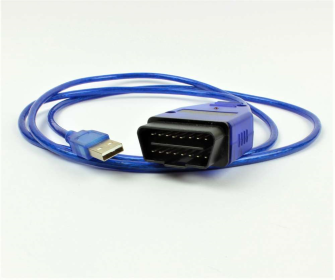](https://wiki.mrkoronas.edim.tech/uploads/images/gallery/2025-06/vag-com-kkl-obd2-409-1-kaapeli-ml-335.png) **VAG-COM 409.1 KKL OBD2 cable** In addition to VAG Group cars (VW, Audi, Seat, Skoda), the VAG-COM KKL 409.1 OBD2 cable also works in some Volvo, Subaru, Alfa Romeo and Fiat. The device can also be used to connect a motorcycle diagnostic program with some motorcycles, like Aprilia, KTM and Triumph brands. These also require an adapter between the OBD2 connector and the motorcycle. **Depending on the software, the reader can do, for example:** - Resetting and reading fault codes (with VCDS-Lite) - Monitoring sensor values live (with VCDS-Lite) - Access to all control modules such as ECU, ABS, air conditioning (with VCDS-Lite) - With the registered VCDS program, it is possible to activate various components and change the data of the control units. **Software and supported brands:** VAG-COM 311.2, 409.1 VW, Audi, Skoda, Seat 1990-2004 [VCDS-Lite -](https://www.ross-tech.com/vcds-lite/download/index.php) VW, Audi, Skoda, Seat 1990-2004 [VOL-FCR](https://www.ilexa.co.uk/diagnostic-tools/vol-fcr/58-vol-fcr-demo-software.html) - Volvo [Multiecuscan](http://www.multiecuscan.net/) - Fiat, Lancia, Alfa Romeo [FreeSSM](https://www.softpedia.com/get/System/System-Miscellaneous/FreeSSM.shtml) - Subaru [ECUExplorer](https://code.google.com/archive/p/ecuexplorer/) - Subaru [TuneECU](https://tuneecu.net/TuneECU_En/index.html) - motorcycles Aprillia, KTM and Triumph --- ## Drivers ##### VAG-COM 409.1 KKL OBD2 cable you will need drivers from FTDI to use the cable, get the latest version of the cables from below [https://ftdichip.com/drivers/vcp-drivers/](https://ftdichip.com/drivers/vcp-drivers/) --- ## How to change hardware ID ##### Step 1: Download the Tool 1. Go to the official [Microsoft VolumeID Download Page](https://learn.microsoft.com/en-us/sysinternals/downloads/volumeid). 2. Click the link that says **"Download VolumeID"**. 3. Open your **Downloads** folder, right-click `VolumeId.zip`, and select **Extract All**. 4. Open the extracted folder. You will see `volumeid.exe` and `volumeid64.exe`. ##### Step 2: Open Command Prompt as Administrator VolumeID requires system-level permissions to modify disk headers. 1. Press the **Windows Key** and type `cmd`. 2. Right-click **Command Prompt** and select **Run as Administrator**. 3. Click **Yes** on the security pop-up. ##### Step 3: Find Your Current ID 1. In the black Command Prompt window, type: `vol C:` 2. Press **Enter**. Note the 8-character code (e.g., `8C4F-12A3`). ##### Step 4: Navigate to the Folder You need to tell Command Prompt where you saved the tool. Assuming it’s in your Downloads folder: 1. Type: `cd %userprofile%\Downloads\VolumeId` (or the specific folder name if different). 2. Press **Enter**. ##### Step 5: Change the ID Now, run the command. Replace `XXXX-XXXX` with any combination of 0-9 and A-F. 1. Type: `volumeid64 C: 1A2B-3C4D` 2. Press **Enter**. 3. A license agreement may pop up; click **Agree**. 4. It should say: **"Volume ID updated successfully."** ##### Step 6: Reboot and Verify 1. **Restart your computer.** The change will not show up until you do this. 2. Once back on your desktop, open **Command Prompt** again. Type `vol C:` and verify the "Volume Serial Number" matches your new ID. --- ## VOL-FCR - Quick Guide This is the main screen for the software and is where you choose the car model to be tested. Each button shows the model and age range that can be diagnosed by this tool. [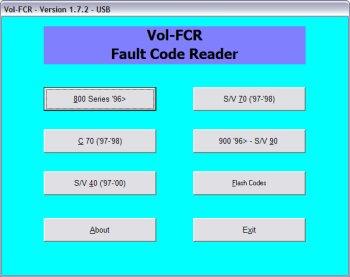](https://wiki.mrkoronas.edim.tech/uploads/images/gallery/2025-06/volfcr-fs.jpg) After choosing the model you wish to diagnose you will see a new screen which shows all the available modules for the chosen vehicle [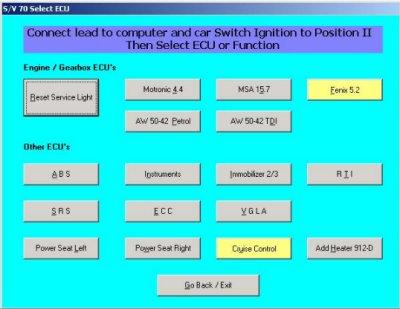](https://wiki.mrkoronas.edim.tech/uploads/images/gallery/2025-06/volfcr-all-modules.jpg) Modules shown in grey are fast data capable and can be diagnosed fully using VOL-FCR. Modules shown in yellow are not compatible with VOL-FCR and must be diagnosed using a flash code tool in a similar way to the LED tester fitted as standard to the under bonnet diagnostic socket on older Volvo cars After clicking the button for the module you wish to diagnose, you will see the following screen where you can start communications between the PC and the car [](https://wiki.mrkoronas.edim.tech/uploads/images/gallery/2025-06/volfcr-abs-startcomms.jpg) After communications are established you will see ECU information displayed. You can now read the fault codes which will be displayed after a few seconds [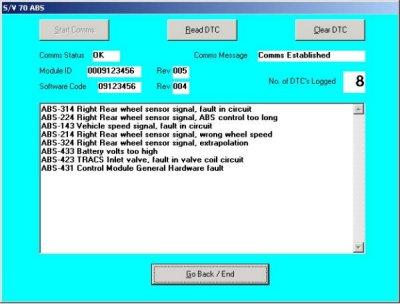](https://wiki.mrkoronas.edim.tech/uploads/images/gallery/2025-06/volfcr-codes.jpg) When the list of codes are displayed the clear codes button is enabled. Of course, you'll have to fix the car to stop them coming back! [](https://wiki.mrkoronas.edim.tech/uploads/images/gallery/2025-06/tdi-timing.jpg) TDI Timing Adjustment Screen ## VOL-FCR - Model and System Coverage Note: We do not sell this software through ebay, or through any distributor in any other country. It is only available direct from our on-line shop here at [https://www.ilexa.co.uk/shop/VOL-FCR](https://www.ilexa.co.uk/shop/VOL-FCR) Our VOL-FCR code reader covers a wide range of Volvo™ models including: - 800 Series 1996 onwards: Covers Reset service light and fault code reading/clearing on Engine (but not Motronic 4.3 and Fenix 5.2), Automatic transmission, ABS, Instruments, Immobiliser, Power seats, SRS air-bag (note Cruise control and ECC are not supported) --- - C70: 1996 - 1997, Reset service light and fault code reading/clearing on Engine, Automatic transmission, ABS, Instruments, Immobiliser, RTI, SRS air-bag, ECC, VGLA, ROP, Power seats, CCU (not cruise control) --- - S40 and V40 1997 - 2000: Covers Reset service light and fault code reading/clearing on Engine (but not Fenix 5.1, Melco 1, or Lucas), Automatic transmission, ABS, Instruments, Immobiliser, RTI, SRS air-bag, ECC, Keyless entry, DSA, Power seats, Additional/Ardic Heater (not Cruise control) --- - S70 and V70 1997 -1998: Covers Reset service light and fault code reading/clearing on Engine (but not Fenix 5.2), Automatic transmission, ABS, Instruments, Immobiliser, RTI, SRS air-bag, ECC, VGLA, Power seats, Additional/Ardic heater (not cruise control) --- - 900 series, S90 and V90 1996 on: covers fault code reading/clearing on Engine (but not LH 2.4 Jetronic or EZ116K), Immobiliser, SRS, RTI. Power seats (not ABS or Cruise control) --- VOL-FCR also displays live data on the following models and systems - 90/900 Series: Motronic 4.4, Auto Trans, SRS, Immobilizer. - 850 Series: Motronic 4.4, MSA 15.7, Auto Trans, ABS, SRS, Instruments, Immobilizer. - 70 Series: Motronic 4.4, MSA 15.7, Auto Trans, ABS, ECC, SRS, Instruments, Immobilizer, VGLA. - 40 Series: EMS2000, DSA, Auto Trans, ABS, SRS, Keyless Entry, Immobilizer. Supplied as software only for use with your existing hardware which must be either serial or FTDi based USB or other similar interface Requires Windows XP NOTE: Vista and Windows 7 are NOT supported. Although you may get it to work on those operating systems, VOL-FCR does not officially support them NOTE. You are purchasing a license to use this software on your own computer. It is not transferable, and we only supply activation codes to the original purchase